Friday, January 21, 2011

Create Encrypted PDF Report from oracle reports


some customers nowadays require to generate PDF reports from oracle that prevent the users from copying its contents or printing this document by the user , so this challenge of course need simple third party that encypt the pdf , but how to implement this soluiton into your application ?

- at first prepare this third party that is $27 ( very cheap ) and monitor one directory for example ( c:\temp) on the application server and make the target directory as any directory inside the apache\htdocs inside the application server , and make other configuration ( password require to open the document yes or no , allow printing yes or no , allow copying contents yes or no , ....)
- after that customize your calling of reports to handle the process , how ?
- before running the report check if the report is encrypted or not , if it is encrypted so make the report file destination to be on the monitored directory ,
after that generate random file name using random package.
- check if the job process is finished , if it is finished so ,create timer of 3 o4 4 seconds ( to allow the third party to finish process )
- after that use web.show_document to show the file (random name) from the target directory

--- note that if you use more than one application server you have to run the third party on each application server , and consider which report server is running to show the document from the right pache\htdocs directory

Wednesday, September 15, 2010

Scanning Documents


Actually , implementing Java code that scans document will take time and much efforts. However i find out a workaround solution that enables you to scan document from oracle forms. The solution is in JAVA SCRIPT.
So, we created a Simple HTML file with simple java script that call Twain.Twain is an exe file that scans documents whatever the scanner type is. So you can use it with any type of scanner and Digital Cameras.
The scenario goes like this:
1- create a table that contains two columns :program blob ,program_path varchar2.
2- upload the file TwainGui.exe to the table in "program " column. "program_path" column represents the path that the user should download the file to it.
3-create an icon or button like "download" in your main form to enable end user to download "TwainGui.exe" from your database.
4- copy the html "scan.html" to htdocs in your application server
5- invoke the html using Web.Show_Document from your application form.

open the scan.html file with notepad and search for "shell.run("
take care of the path in "shell.run(" it must be the same path in "program_path" column
download the file
and copy the content into D:\ drive and double click on scan.html

Tuesday, September 14, 2010

How to create Your PJC from scratch

firstly I would like to thank my brother and my best friend Haythem for his valuable participation in this blog.

Many forms developers are interested in PJC(pluggable Java component) . But most o the problem is how to implement a new Java bean. In this demonstration , I shall discuss in Arabic language a very simple implementation for Java bean in forms world. I hope you enjoy it.


this idea can be improved to be a drawing program that used for furniture manufacturer to read the dimension of the pieces from the database and output the result in graphic shapes.

Wednesday, April 21, 2010

Sample Demo For My Private Under Development Application

You can download these Demo presentation from the following link :
http://www.4shared.com/file/xmie15qz/haythem_application.html

Tuesday, December 29, 2009

Flexible Contact query for all entities in your application


as we published the first version of the contact object group that can be added to any form in your application and register your entities that you want to have contact , here we will publish the query process of this component

the screen is base on two blocks :
1- search block ( field for selecting the master database file i.e users , customers , operating units ..... etc another field for selecting the contact entity i.e the specified person or the specified customers )

2- the contact block that based on the contacts table to display the data according to the search criteria in the above block


the Implementation :


1- on your when new form instance trigger or your program unit that called in when new form instance trigger write the following code:
--- FILL THE MASTER FILE SEARCH WITH THE DATA
u_program_pkg.P_POPULATE_LIST('SERACH_BLK.MASTER_FILE','SELECT ARABIC_DESC,TABLE_NAME FROM GN_TABLE
WHERE ENABLE_CONTACT=1');

where the gn_Table is the table that keep the names of the tables of the system that designed to have contact , also this table contain the select statement for the id and the name of the entity to be used in the list of value to get the specified entity ( person , user , custoemr , supplier ,.... etc)
2- on when list changed of the above list item
vREG_ID RECORDGROUP;
vEXECUTE NUMBER;
BEGIN
vREG_ID := FIND_GROUP('flex_group');
IF NOT ID_NULL(vREG_ID) THEN
DELETE_GROUP(vREG_ID);
END IF;
vEXECUTE := POPULATE_GROUP_with_query(vREG_ID,:p_query);
set_lov_property('flex_lov',group_name,'flex_group'); to assign the used select statement for the selected master table in the list iem

3- now the list of values now assigned with the id and the name of the entity that you will select form to display the contacts assigned to this specified entity

Thursday, November 5, 2009

Get Online Currency Exchange Rates


here we will explain how to use a java bean in the forms to get the currecny exchange rates from webservice provided by a website on the internet

first step for implementing this java bean is
1- put the jar file CurrencyExchange.jar in the path form
2- add the path of this jar file with the full name in the archivjinit paramter in your working section in the Fromsweb.cfg file
3-add the full path in step 2 also in classpath parameter in Default.env file

4- create new form and create a bean item and set its implementation class to
oracle.forms.jvr.CurrencyExchange

5- create items that hold from currency and to currency with the values of standard currency symbol

6- call the following code

fbean.invoke('yourblock.yourbean',1,'setFrom',:fromcurrencybindvariable);
fbean.invoke('yourblock.yourbean',1,'setTo',:tocurrencybindvariable);
:bindvariableforresult:=fbean.invoke_char('yourblock.bean',1,'change','');

the jar file link
http://www.4shared.com/file/146643242/9c8e15e6/CurrencyExchange.html

Sunday, September 6, 2009

Dynamic Import using sqlldr


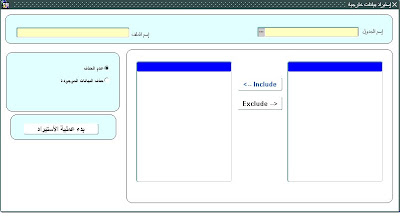
Here i provide a form that can be used to import dynamically data from a specified file to selected table and columns
- this version run in the environment that the database and application server is on the same server , other environment needs extra code adding to the provided code.
- you can add new feature or functionality to the code provided , or enhance the existing code according to your requirements


-- You choose the table that you want to upload data into from the provided list of the tables in your schema.

-- you will choose the columns form the table column list populated
-- write the file name with extension that you want to upload data from

-- choose if truncte the table or append the data to the existing data


------ the explaination of the mechanism
-- the main idea is to dynamically create the control file , and the batch file that will change the running oracle home and run the Sql loader command using the control file created
an audit piece of code is issued at the end of the program unit to audit the importing process.
-- the user will only choose the table and column and write the file name with extenstion .
--- Code Sample -----
PROCEDURE Import_process IS
v_load_directory varchar2(30);
V_FILE_TYPE UTL_FILE.FILE_TYPE;
v_directory_path varchar2(200) ;
v_file_name varchar2(50);
v_ext varchar2(3);
V_COL_LIST VARCHAR2(500);
V_SEP_POS NUMBER(3);
V_ORA_HOME VARCHAR2(500);
v_bat_file_name varchar2(500);
v_control_file varchar2(50);
BEGIN

if :table_name is null then
message('You Must Choose Table For Importing Process'); message('You Must Choose Table For Importing Process');
raise form_trigger_failure ;
end if ;
if :file_name is null then
message('You Must Specify File Name You Want to Upload'); message('You Must Specify File Name You Want to Upload');
raise form_trigger_failure ;
end if ;
if Get_List_Element_Count('SELECTED_COLS')=0 then
message('No Column Selected For Importing Process');message('No Column Selected For Importing Process');
raise form_trigger_failure ;
end if ;
--- start collecting information and parameters for the process
v_load_directory:=sm_check_pkg.check_application_setting('LOAD_DATA_DIR');
v_directory_path :=sm_get_pkg.get_directory_path(v_load_directory);
v_file_name:=substr(:file_name,1,instr(:file_name,'.')-1) ;
v_ext:=substr (:file_name,-3) ;
V_ORA_HOME:=SM_CHECK_PKG.CHECK_APPLICATION_SETTING('DB_ORA_HOME');


V_COL_LIST:='';
For i IN 1 .. Get_List_Element_Count('SELECTED_COLS') Loop
V_COL_LIST:=V_COL_LIST','Get_List_Element_Value( 'SELECTED_COLS', i );
End loop ;
---V_SEP_POS:=INSTR(V_COL_LIST,',',-1);
V_COL_LIST:=SUBSTR(V_COL_LIST,2);

-- CREATE TEH CONTROL FILE
v_control_file:=dbms_random.STRING('b',8)'.''ctl';
v_file_type:=utl_file.fopen(v_load_directory,v_control_file,'W');
UTL_FILE.putf(V_FILE_TYPE,'LOAD DATA'); -- first line
UTL_FILE.new_line(V_FILE_TYPE); ------------------------------------------
UTL_FILE.putf(V_FILE_TYPE,'INFILE ''''' v_directory_path'\':file_name''''); -- second line
UTL_FILE.new_line(V_FILE_TYPE); ------------------------------------------
UTL_FILE.putf(V_FILE_TYPE,'BADFILE ''''' v_directory_path'\'v_file_name'.''bad'''''); -- third line
UTL_FILE.new_line(V_FILE_TYPE); ------------------------------------------
UTL_FILE.putf(V_FILE_TYPE,'DISCARDFILE ''''' v_directory_path'\'v_file_name'.''dsc'''''); -- fourth line
UTL_FILE.new_line(V_FILE_TYPE); ------------------------------------------
UTL_FILE.putf(V_FILE_TYPE,:PREDATA_02);
UTL_FILE.new_line(V_FILE_TYPE); ------------------------------------------
UTL_FILE.putf(V_FILE_TYPE,'INTO TABLE ''"TMS"''.''"':TABLE_NAME'"');
UTL_FILE.new_line(V_FILE_TYPE); ------------------------------------------
UTL_FILE.putf(V_FILE_TYPE,'FIELDS TERMINATED BY '''''';''''');
UTL_FILE.new_line(V_FILE_TYPE); ------------------------------------------
UTL_FILE.putf(V_FILE_TYPE,'('V_COL_LIST')');
UTL_FILE.fclose(V_FILE_TYPE);
synchronize;

---- CREATE THE BATCH FILE
v_bat_file_name:=dbms_random.STRING('b',8)'.''bat';
v_file_type:=utl_file.fopen(v_load_directory,v_bat_file_name,'W');
UTL_FILE.putf(V_FILE_TYPE,'@echo on ');
UTL_FILE.new_line(V_FILE_TYPE); ------------------------------------------
UTL_FILE.putf(V_FILE_TYPE,'set oracle_home='v_ora_home);
UTL_FILE.new_line(V_FILE_TYPE); ------------------------------------------
UTL_FILE.putf(V_FILE_TYPE,'cd\');
UTL_FILE.new_line(V_FILE_TYPE); ------------------------------------------
UTL_FILE.putf(V_FILE_TYPE,v_ora_home'\bin\sqlldr.exe '
'userid=tms/tms@hdb control='v_directory_path'\'v_control_file);
UTL_FILE.fclose(V_FILE_TYPE);
synchronize;
host('start 'v_directory_path'\'v_bat_file_name);
if Form_success then
paragma_pkg.p_import_audit(info_pkg.get_current_user_id,v_control_file,v_bat_file_name);
end if ;
END;